Tampilkan postingan dengan label Ads. Tampilkan semua postingan

Sabtu, 29 Oktober 2016

Create A Membership Site

Way No 6 - Create A Membership Site

What is a Membership Site?

A membership site is a private website, with exclusive content available only to the signed up members.

It usually provides members with the ability to interact with each other. They pay a monthly fee for being a member of the website.

Suitable For -

People who like to interact with, guide and lead a community.

Skills Required -

1. In-depth knowledge of any particular domain.

2. Ability to research new things and constantly generate new and helpful content.

Time Required For Creating A Membership Site -

Depends on the domain expertise of the creator.

Do Google search for Matthew Woodward's tutorial on how to create a membership site for free.

Tips -

1. In the beginning keep the fee for joining the membership site ridiculously low.

Aim to create a minimum viable product instead of creating a perfect product. You can always improve your site in later stages.

2. If you’ve never been a part of any membership site till now, consider joining a few related to your domain. Study those sites.

3. Find what’s working well for you and other members of that site? What’s makes it worth the monthly fee and how could you replicate this?

4. Interact and engage with members. Your membership site shouldn’t be the one that only drip feeds the content, with little or no input from the owner.

You must provide insider access for your members who want to communicate with you.

Even if you’re busy, you must spend at least half an hour a day to get involved with your membership site.

You can do this by many ways, such as you can interact with the members answer their questions or even lead an interaction inside the forum.

5. Run group events and challenges to increase members’ engagement with your site.

Organize regular events, challenges, or similar.

Make it easy for members to participate. Offer prizes, display leaderboards or similar such things creates a great incentive for members to participate and get involved.

6. Periodically review what’s working and what isn’t. Try to adapt the site based on the member's’ needs.

For e.g. If you offer most of your content in text format but your members are engaging more with the video content then shift from text-based to video content.

7. Try to introduce new initiatives and see how your audience is responding to it. Such as live Q&A calls or similar.

But be careful, don’t overwhelm members with several different initiatives at once. Introduce one thing at a time.

How To Monetize -

Monetization is very simple. More members sign up to your website more income you generate from the monthly fees that members pay.

Create A Membership Site

Way No 6 - Create A Membership Site

What is a Membership Site?

A membership site is a private website, with exclusive content available only to the signed up members.

It usually provides members with the ability to interact with each other. They pay a monthly fee for being a member of the website.

Suitable For -

People who like to interact with, guide and lead a community.

Skills Required -

1. In-depth knowledge of any particular domain.

2. Ability to research new things and constantly generate new and helpful content.

Time Required For Creating A Membership Site -

Depends on the domain expertise of the creator.

Do Google search for Matthew Woodward's tutorial on how to create a membership site for free.

Tips -

1. In the beginning keep the fee for joining the membership site ridiculously low.

Aim to create a minimum viable product instead of creating a perfect product. You can always improve your site in later stages.

2. If you’ve never been a part of any membership site till now, consider joining a few related to your domain. Study those sites.

3. Find what’s working well for you and other members of that site? What’s makes it worth the monthly fee and how could you replicate this?

4. Interact and engage with members. Your membership site shouldn’t be the one that only drip feeds the content, with little or no input from the owner.

You must provide insider access for your members who want to communicate with you.

Even if you’re busy, you must spend at least half an hour a day to get involved with your membership site.

You can do this by many ways, such as you can interact with the members answer their questions or even lead an interaction inside the forum.

5. Run group events and challenges to increase members’ engagement with your site.

Organize regular events, challenges, or similar.

Make it easy for members to participate. Offer prizes, display leaderboards or similar such things creates a great incentive for members to participate and get involved.

6. Periodically review what’s working and what isn’t. Try to adapt the site based on the member's’ needs.

For e.g. If you offer most of your content in text format but your members are engaging more with the video content then shift from text-based to video content.

7. Try to introduce new initiatives and see how your audience is responding to it. Such as live Q&A calls or similar.

But be careful, don’t overwhelm members with several different initiatives at once. Introduce one thing at a time.

How To Monetize -

Monetization is very simple. More members sign up to your website more income you generate from the monthly fees that members pay.

Sell Websites On Flippa

Way No 7 - Sell Websites On Flippa

What is Flippa.com?

Flippa.com is an online marketplace for selling and buying websites.

Suitable For -

People who like to develop websites.

Skills Required -

In-depth knowledge of Wordpress platform and website creation.

Time Required For Creating A Website -

Depends on the expertise of the developer in website creation.

Tips -

1. Choose a topic you are passionate about. You need to be passionate about the subject your website focuses on.

If you launch a website about something that you don’t care about, you will lose interest very quickly and inevitably stop working on it.

2. Think about your long-term business model.

To make your website successful you should do a lot of research beforehand.

Try to find the answers to the following questions:

Who are your direct competitors?
How do your competitors make money?
How will your website make money?
How can you make your website stand out from others?
How long will it take to monetize your website?
3. Choose a domain name that is relevant to your topic and appeal to your target audience.

A good domain name is an essential part of branding your blog. Choose .COM as your domain extension because it looks more professional.

4. Choose a reliable paid host like Hostgator, Bluehost or anyone that might suit your needs.

5. You need make your website's design and layout look very professional.

Believe it or not but first-time visitors will make a judgement about your website within first 10 seconds of loading, so you need to make sure that your website’s design appeals to them and they like it.

How To Monetize -

1. Register your website on flippa.com. Flippa works on bidding model, the highest bidder gets the ownership of the website.

2. Set the bid price of your website 15 times greater than the current monthly income of your site.

For e.g. If your site is earning $500 per month then you can set the basic selling bid price of your site to at least $7500.

3. Start the auction and wait for bids. People will start bidding for purchasing your site.

Once you receive the bid that satisfies your target selling price, then finalize the deal with the bidder.

4. Flippa.com will manage all the payment and other technical stuff for you and you'll receive your commissions via your selected payment method.

Sell A Video Course On Udemy

Way No 8 - Sell A Video Course On Udemy

What is Udemy.com?

Udemy is an online learning marketplace.

It has a huge collection of courses in everything from programming to yoga to photography and much more.

You can create a course in text, audio and video formats. Every course is available on demand and students can learn at their own pace, on their own time and on any device.  

Suitable For -

People who like to teach, explain and solve problems.

Skills Required -

1. In-depth knowledge of any domain of your choice.

2. Ability to express knowledge in easily understood form.

3. Ability to create and record high-quality videos.

Time Required For Creating A Video Course -

Depends on the scope of the course, number of modules included and time required for preparation.

Tips -

1. Pick a topic in which you are specialized in.

2. Study the courses relevant to your topic and see how many people are interested and have actually enrolled in the courses.

This will give you a rough understanding of the people who are interested in your topic and willing to invest in your course.

3. Study the other available courses and find out the things which you can offer that will make your course much better, different than other available courses.

4. Identify your audience level and then create the course content.

For e.g. You need to first decide whether your course is for a beginner level or an expert level audience.

Then accordingly you need to create your course content which appeals to the right audience.

5. Make sure your course title and description is optimized for appealing your target audience.

Try to answer the frequent questions that your audience asks in your course description.

6. Deliver at least 80% of your course in video format as it is the most engaging way of interaction.

Also keep the length of each video lesson between 2-10 minutes.

7. Build a rapport with the audience, and engage. You can always do a quiz ups between lectures to make it engrossing and interactive.

How To Monetize -

1. Udemy gets a lot of daily visitors so there is a good chance that your course will get noticed and people will enroll in and you will start earning money.

2. You can even start a small blog on your course-related topics and promote your course.

3. More people sign up for your course more money you make.

Publish A Kindle eBook

Way No 5 - Publish A Kindle eBook

Publishing an Kindle eBook is another simple way of generating consistent passive income.

Did you know that Amazon.com is the biggest competitor to Google than any other search engine like Yahoo or Bing?

More shoppers try to search a product on Amazon than on any traditional search engine.

When people want in-depth information on a specific topic, they don’t search for blog posts on Google but instead try to find a highly recommended book on Amazon.

Your aim should be to leverage the power of Amazon.com’s growing outreach and popularity to generate a stable passive income source.

Suitable For -

People who have in-depth knowledge on a certain topic or love to do research and explain it in an easily understood from.

Skills Required -

1. Ability to provide detailed insights on a particular topic.

2. Ability to provide some extraordinary tips for solving people’s problems.

Time Required For Creating An eBook -

The time required completely depends on the creator of the eBook. What topics he/she wants to cover? How many details does the creator want to include?

These are the important factors that define the time required.

Tips -

1. Research, research and research. It is the key to successful Kindle eBook product.

Research about what people are looking for in the domain related to your eBook's topic.

For example, if you are creating an eBook on ‘Yoga exercises to lose weight' look for how many people are looking for yoga exercises to lose weight on the internet and Amazon? What are their expectations from a book?

You can easily conduct this research by studying the comments, reviews and popularity of the existing competitor's books on Amazon.

2. Write for one reader. When you know your ideal reader, you know how much he/she already knows.

You can avoid boring him/her with obvious information, and you can provide exactly the information he/she’s looking for.

3. Check out how many people are asking questions on the topic you have chosen, using websites such as Quora, Yahoo Answers, and WikiAnswers.

More questions mean more people are looking for answers and that’s a good sign. 

5. Look out for the market gaps in your selected domain. And see whether there’s demand for some topic, see whether your eBook can cater that demand.

6. Visit Amazon.com and see how many books are present in your selected domain. Are people buying those books?

This will help you to understand the demand and purchasing ability of the market in your domain.

7. Find a few friendly readers who match your ideal reader profile and give them your first draft.

Not only will they help make your book better, it will also boost your confidence. 

How To Monetize -

Sign up to Kindle Direct Publishing Program, with this you award exclusive distribution rights for your Kindle eBook to Amazon.

This will allow you to sell your eBook in all the countries where Amazon.com is available giving it a massive exposure at launch.

Create a small niche site on the related topic and promote your eBook through it. The more eBooks you sell the more money you make.

Create Niche Websites

Way No 4 - Create Niche Websites

What is Niche Website?

Niche Website is a small website focused on one particular topic which shares all the information relevant to the topic that is both useful and interesting for the target audience.

A niche website can be of few pages or even of hundreds of pages depending upon the size of the niche.

Suitable For -

1. People who have an interest in a very specific topic within a large domain.

For e.g. In large a domain like Yoga, you can choose specific sub-domain such as ‘Yoga to lose weight.’

2. People who love to talk, write, explain and have the ability to persuade. 

Skills Required -

1. Ability to create Niche website based on specific sub-domain using Wordpress, Blogger or other available software and tools.

2. Ability to promote niche website using social media, ads etc.

Time Required For Starting A Niche Website -

You can start a Niche Website within a day. But creating a good content for the website might take time.

Tips -

1. Write out as many niche site ideas as you can, using the sub-domain that interests you the most.

2. Narrow down your niche idea based on finding the answers to the following questions:

What is the audience size of your niche?
Is your audience known for spending money for purchasing the niche related products?
Are there multiple products available which you review on your site?
Are there affiliate programs that provide more than 50% commissions?
What is your investment budget?
3. Create at least 10 articles of rich content containing 1000 words, those articles will provide great value to your niche targeted audience.

4. Sign up for at least 2 affiliate programs that offer products related to your niche with more than 50% commissions.

5. Do keyword research and find at least 15-20 niche relevant search terms and try to rank your site for them.

6. Try to network with the owners of the authority blogs in your niche and find guest blogging opportunities.

How To Monetize -

Promote the products relevant to the topic of your niche website by placing affiliate links in the content and sidebar of your site.

Try to get more visitors to your site by doing SEO, forum marketing, social media and paid ads.

More people visit your niche site and buy products through your affiliate link, more money you make.

How about creating 10 more Niche Websites with every site generating $500 a month in affiliate commission that would be $5000 of passive income per month.

Do Affiliate Marketing

Way No 3 - Do Affiliate Marketing

What is Affiliate Marketing?

Affiliate marketing is a type of performance-based marketing in which a business rewards a certain percentage of commission for each product bought by the customers who are brought by the affiliate's own marketing efforts.

Suitable For -

People who love to talk, write, explain and have the ability to persuade. 

Skills Required -

Ability to promote product online using social media, videos, ads etc.

Time Required For Starting Affiliate Marketing -

Virtually within an hour. You just need to select an online product that pays you a commission when you promote and sell it using your affiliate link.

Tips -

1. Select an online product from the domain in which you are well conversant with. For example, if you are a dietician then select a product related to diet.

There are lots of products available in every domain you just need to find a domain which is suitable for you.

2. Places to find products: Clickbank.com, Shareasale.com, Jvzoo.com. These websites have thousands of products listed from multiple domains.

3. Choose a product that pays you at least 50% commission on each sale.

4. Most product websites handle affiliate link generation and payouts so you don’t need to worry about how you’ll get your commissions.

Just get your custom affiliate link created by the vendor and start promoting it.

5. If you want to earn instant money from affiliate marketing try to promote your affiliate link on social sites such as Facebook, Twitter, Digg, StumbleUpon, and Reddit.

How To Monetize - 

Monetization is simple, just make more people to buy the product through your affiliate link.

Create a Facebook page or Banner ads with the aim of promoting the product.

Tell people how the product will help them to solve their problems.

Improve people’s knowledge about the domain and help them to solve other related problems.

Do Affiliate Marketing

Way No 3 - Do Affiliate Marketing

What is Affiliate Marketing?

Affiliate marketing is a type of performance-based marketing in which a business rewards a certain percentage of commission for each product bought by the customers who are brought by the affiliate's own marketing efforts.

Suitable For -

People who love to talk, write, explain and have the ability to persuade. 

Skills Required -

Ability to promote product online using social media, videos, ads etc.

Time Required For Starting Affiliate Marketing -

Virtually within an hour. You just need to select an online product that pays you a commission when you promote and sell it using your affiliate link.

Tips -

1. Select an online product from the domain in which you are well conversant with. For example, if you are a dietician then select a product related to diet.

There are lots of products available in every domain you just need to find a domain which is suitable for you.

2. Places to find products: Clickbank.com, Shareasale.com, Jvzoo.com. These websites have thousands of products listed from multiple domains.

3. Choose a product that pays you at least 50% commission on each sale.

4. Most product websites handle affiliate link generation and payouts so you don’t need to worry about how you’ll get your commissions.

Just get your custom affiliate link created by the vendor and start promoting it.

5. If you want to earn instant money from affiliate marketing try to promote your affiliate link on social sites such as Facebook, Twitter, Digg, StumbleUpon, and Reddit.

How To Monetize - 

Monetization is simple, just make more people to buy the product through your affiliate link.

Create a Facebook page or Banner ads with the aim of promoting the product.

Tell people how the product will help them to solve their problems.

Improve people’s knowledge about the domain and help them to solve other related problems.

Start A Blog

Way No 2 - Start A Blog

Being a blogger is one of the easiest ways to earn money from home.

Unlike any other job, if you are blogging from home. You don’t need to work 9-5.

You can work at any time of the day with ease.

But beware blogging takes time before it starts making money for you.

So I suggest you jump into this field slowly.

If you have a day job, don’t quit it. Start part-time with your blog.

Once it is on the stage where it is earning you more than your comfortable limits then it’s the best time to turn into full-time blogging mode.

Suitable For -

People who love to write and would like to share their knowledge and expertise with the world.

Skills Required -

Ability to express knowledge in writing with simpler yet effective way.

Time Required For Starting A Blog -

The time required depends upon your level of expertise if you are an expert you can easily start a blog within few hours.

For a complete beginner, a day or two would be sufficient to be ready with the basic setup.

Tips - 

1. Start a blog about something in which you are really good at.

For e.g. If you love travelling and you have travelled a lot of places then start a travel blog. 

2. Always try to limit your blog to a particular domain. Don’t put content about multiple domains in one blog.

For e.g. Writing about recipe tips on a fashion blog.

Keep your blog specific to one domain only.

3. Using your experience and expertise, try to create a very unique and phenomenal content.

4. Try to give a lot of value to your readers. Write about something that will make a difference in your reader's’ life.

5. Listen to the readers of your blog. Try to solve the problems they are facing. Always reply to their comments. Make them feel better.

6. Be committed to your blog. A blog is like a relationship. Give it some love and it will flourish. Ignore it and it will die a death.

There’s no point in being half-hearted in your blogging efforts - if you don’t care about it, why should anyone else?

7. Think about content, style, tone of voice, audience, etc.

Look at the people who already do what you’re planning to do.  Ask yourself the following questions:

How will I stand out from the crowd?
What can I say that hasn’t already been said?
What’s my unique selling point?
Why do I want to do this?
8. Be professional in the way you handle and grow your blog.

Don’t criticize other brands, bloggers or people. Remember what goes around comes around.

You don’t want something you’ve said to come back and bite you one day.

9. Be open minded and willing to collaborate with other creatives. You’ll meet some fantastic and awe-inspiring people.

How To Monetize -

You can monetize your blog by recommending products or services related to your blog’s topic either by writing an informative article or placing banner ads on your blog’s relevant pages.

You can earn handsome commissions when a person buys a product recommended by you.

Another way is you can place Google Adsense ads on your blog. More people click on your ads more money you will make

Start A YouTube Channel

Way No 1 - Start A YouTube Channel

Starting a Youtube channel is the simplest way of making money online and needs no investment.

YouTube gets almost 5 billion video views per day which proves its power on the internet.

Felix Kjellberg, the owner of PewDiePie (a YouTube account), has earned 12 million dollars in 2015 by running a single YouTube channel.

You too can see such success if you capitalize on the opportunity that YouTube provides us currently.

Suitable For -

People who love to create videos, like to talk in front of a camera, shoot documentaries or short films.

Skills Required -

Ability to create a video using software tools or record a video using your mobile phone or camcorder.

Time Required For Starting A YouTube Channel -

Virtually you can start within minutes. You'll have to visit YouTube.com, create a channel and upload videos.

Tips -

1. Create a YouTube channel around a specific theme such as Humor, Tutorial, Recipe, etc. Don’t just go out create any random unrelated videos channel.

For e.g. If you love gadgets you can create a gadget reviews channel where you can post review videos of the latest gadgets and help people to decide whether it's a right choice for them.

2. Select a theme in which you're really interested. Analyze other videos related to your topic, see how many views those videos get.

It will help you to get an overview of how many people are interested in your theme. 

3. Generally more the views more beneficial the theme is. As more people are searching for it.

4. Check out if there’s any missing concept in the currently existing videos related to your theme.

You can cover these concepts in your videos to fetch more views.

5. Give your best to engage with your audience. Study comments people leave on your videos, learn the hidden expectations that your audience has from you.

6. Try to find out what they like about your videos and what they don't. Study which videos get the highest retention rate and find the reasons behind them.

7. Spy on your competitors and try to model the things that are working for them. But never try to copy them, always maintain your uniqueness.

8. Always try to improvise each new video from the last one.

So when you look at your first videos after few years, you should think aww how bad I was earlier.

That's a good sign; it shows that you've improved.

9. Experiment, experiment and experiment. Never fear to try something new and see how it works.

Experiments are the only way where you can find new and exciting stuff which can catapult you way ahead of your competitors.

10. Finally, try to collaborate with other YouTuber's who are doing similar work.

Learn their strategies and mindset. Working together can do wonders for your channel.

11. Have fun. Do the things that you love and enjoy your life. 

How To Monetize -

The general rule for monetization in YouTube is very simple. More views your videos get, more money you’ll earn.

You’ll just have to enable the monetize option in your YouTube channel settings.

It's very simple.

Minggu, 01 Mei 2016

Bagai Mana Mereka bekerja

Bagaimana Apakah Ini Manfaat Me?

Ada banyak manfaat untuk Minat Iklan termasuk:

Menjaga situs web dan aplikasi gratisMenyediakan konten, layanan, penawaran, dan iklan yang lebih baik cocok dengan minat AndaLebih sedikit iklan mengganggu atau menggangguMembantu bisnis lebih baik melayani Anda

IBA / CAA juga memainkan peran integral dalam mendorong pertumbuhan ekonomi dan mendorong persaingan antar perusahaan. Affords usaha kecil dan startups kemampuan untuk membuat konten dan layanan baru.

Jadi, mengapa iklan yang relevan penting bagi Anda dan pengiklan? Dengan menjaga iklan yang relevan dengan Anda, pengiklan tidak membuang-buang waktu Anda dengan iklan mengganggu dan menjengkelkan sementara juga memastikan mereka tidak membuang-buang uang untuk mencoba untuk menjangkau khalayak yang salah.

Misalnya, bagaimana jika Anda terus melihat iklan untuk mesin pemotong rumput dan traktor ketika Anda tinggal di sebuah apartemen di New York City? Anda tidak akan ingin melihat iklan untuk sesuatu yang Anda tidak tertarik untuk membeli.Demikian pula, pengiklan tidak ingin menghabiskan uang untuk memberitahu Anda tentang produk atau layanan yang tidak menarik bagi Anda. Dan ini adalah mengapa IBA / CAA membantu Anda dan pengiklan.

Apalagi jika pengiklan dapat menempatkan iklan yang lebih efektif dan relevan, mereka akan membayar lebih untuk menunjukkan kepada mereka. Ini berarti bahwa situs web yang Anda kunjungi dapat memperoleh pendapatan yang sama dengan lebih sedikit - iklan - dan lebih baik.Pada gilirannya, situs ini dan aplikasi dapat terus memberikan Anda konten dan layanan gratis.

Memahami Iklan Online

Iklan online adalah istilah yang luas yang digunakan untuk menggambarkan dibayar iklan yang penerbit menempatkan di situs Web mereka untuk memungkinkan mereka untuk memberikan konten dan layanan gratis. Tapi apa yang kebanyakan orang mendengar tentang adalah jenis tertentu dari iklan online yang disesuaikan dengan minat kemungkinan Anda dengan perusahaan mempromosikan produk atau jasa mereka. Hal ini dikenal sebagai Minat Iklan (IBA) , ketika itu terjadi di seluruh situs, dan Cross-App Advertising (CAA)ketika terjadi di seluruh aplikasi.

IBA / CAA sebabnya mengapa Anda melihat iklan yang relevan dengan Anda. Dengan jenis iklan, perusahaan anggota NAI dan pengiklan mengumpulkan informasi di beberapa situs yang Anda kunjungi dan aplikasi yang Anda gunakan.Mereka kemudian menggunakan informasi ini untuk mencoba untuk memprediksi apa iklan mungkin paling menarik untuk Anda .

Pada dasarnya, situs gratis dan aplikasi anda menikmati dapat digunakan untuk membantu melayani iklan yang Anda akan menemukan lebih bermakna, informatif, dan menarik, daripada akan orang itu duduk di sebelah Anda. Membaca artikel tentang wisata? Anda mungkin akan melihat iklan untuk perjalanan tak lama setelah. Memeriksa situs web musisi? Anda mungkin mendapatkan beberapa iklan untuk musik bermunculan segera juga.

IBA / CAA tidak tergantung pada informasi yang mungkin diidentifikasi secara pribadi kepada Anda seperti nama, nomor telepon, nomor Jaminan Sosial, dll Bahkan, sebagian besar perusahaan pihak ketiga tidak ingin tahu siapa Anda adalah untuk IBA / CAA. Mereka hanya ingin menghubungkan kategori minat (perjalanan cinta) atau data demografi (laki-laki di bawah 30) dengan browser Anda sehingga mereka dapat melayani sampai iklan yang relevan. Tentu saja, perusahaan yang berbeda menggunakan metode yang berbeda dari IBA / CAA.

Demikian pula, pengiklan umumnya tidak ingin tahu pengenal permanen perangkat mobile Anda untuk melayani Anda iklan yang relevan. Sebagian besar sistem operasi mobile modern mengandung Identifiers Iklan Mobile, atau pengenal lebih sementara, yang telah built-in kontrol privasi.Sebagai contoh, ID iklan pada perangkat Android, Windows, dan iOS memiliki opsi untuk memilih dari periklanan berbasis minat atau lintas-aplikasi iklan dan mereka memiliki pilihan bagi Anda untuk mengubah pengenal iklan Anda. Pengiklan kontrak diperlukan untuk menggunakan Mobile Advertising Identifier ramah privasi ini, bukan pengenal perangkat yang sebenarnya Anda. Ini berarti Anda memiliki kontrol atas apakah iklan yang relevan dengan Anda.

mobile browser saat ini tidak menggunakan Identifiers Iklan Mobile dan sebagai gantinya, menggunakan pengidentifikasi browser standar (sering, cookies). Ini berarti pilihan Anda berlaku untuk masing-masing browser dan identifier seluler secara terpisah.Y


Selasa, 26 April 2016

MENGGUNAKAN FACEBOOK PIXEL DAN DPAS DENGAN GOOGLE PENGELOLA TAG

SIMPLE GUIDE TO MENGGUNAKAN FACEBOOK PIXEL DAN DPAS DENGAN GOOGLE PENGELOLA TAG

Facebook Pixels membangun kustom Pemirsa dari lalu lintas situs Web Anda. Tapi, apa yang Facebook Pixel memungkinkan?Apa itu benar-benar? Dan bagaimana cara memasangnya di Google Pengelola Tag?

Masalah dengan piksel adalah salah satu masalah yang paling umum dalam obrolan dukungan pelanggan kami dan paling dicari untuk masalah di Pusat Dukungan kami, jadi kami pikir kami akan berbagi panduan ini untuk non-pengembang dengan khalayak yang lebih luas.

Ini berguna untuk menambahkan Facebook Pixel ke situs Anda, bahkan jika Anda belum berencana untuk menggunakan penargetan ulang atau Iklan Produk Dinamis, karena konversi tua pelacakan piksel akan dihapuspada paruh kedua 2016 dan Anda dapat mulai membangun Kustom Pemirsa untuk penggunaan masa depan.

Panduan ini adalah dalam dua bagian. Pertama, kita akan membahas cara mengatur Pixel Facebook Anda di Google Pengelola Tag sehingga itupelacakan lalu lintas dari semua halaman website Anda . Kemudian, kita akan mendalami bagaimanamelakukan penargetan ulang yang lebih canggih dengan membangun pemirsa berdasarkan perilaku pengguna bersama corong belanja Anda. Ini akan memungkinkan Anda untuk cross-sell dan upsell dengan Iklan Produk Dinamis.

Catatan: Panduan ini mengasumsikan bahwa Anda memiliki Google Pengelola Tag terpasang dan bahwa Anda memiliki dataLayer di website Anda. Sebuah dataLayer merupakan wadah untuk data yang ingin Anda untuk memproses dan menyampaikan dari situs web Anda ke aplikasi luar seperti, dalam hal ini, Google Tag Manager. Jika situs Anda tidak memiliki satu lagi, Anda harus berbicara dengan pengembang Anda. Anda dapat menemukan jawaban untuk pertanyaan yang paling sering ditanyakan tentang Google Pengelola Tag sini dan pedoman bagi pengembang di sini .

Bagian 1: Memasang Facebook Pixel

Kode Facebook Pixel terdiri dari JavaScript pendek dengan ID pengiklan khusus pixel. Jika Anda belum memiliki ID pixel unik Anda, Anda dapat menemukannya di Iklan Manager. Lihat Panduan Penerapan Pixel Facebookuntuk informasi lebih lanjut tentang pixel.

Setelah Anda menemukan kode pixel atau ID pixel:

Buka Google Pengelola TagDari menu kiri, klik Tag dan Buat tag baruMengubah nama tag dari Tag Untitled ke "Facebook Pixel"Pilih produk: Pilih tag HTMLKonfigurasi Tag: Klik Configure Tag dan paste kode pixel Facebook AndaApi Pada: Pilih semua PagesBuat Tag

Sekarang, semua yang perlu Anda lakukan adalah mengklik Publish di kanan atas untuk mempublikasikan pixel Facebook Anda di semua halaman website Anda. Anda dapat menggunakan Facebook Pixel Helper Chrome Pluginuntuk memeriksa bahwa Pixel bekerja dengan benar. Anda sekarang siap untuk mulai mengumpulkan penonton situs kustom dan lookalikes.

Bagian 2: Menambahkan Iklan Produk Dinamis Modifikasi

Jika Anda ingin membuat penonton yang lebih canggih, seperti "orang yang menambahkan produk ke keranjang mereka dalam 7 hari terakhir tetapi tidak membeli", Anda perlu membuat tiga tag lainnya di Google Pengelola Tag. Ketiga tag baru akan membiarkan Anda melacak ketika orang di situs Anda melihat produk, menambahkan produk ke keranjang dan pembelian produk.

Menambahkan modifikasi pixel DPA ini adalah proses empat langkah:

Menemukan variabel di situs AndaHubungkan variabel ke Google Pengelola TagBuat Google pemicu Pengelola TagTambahkan modifikasi pixel

1. Cari Nama Variabel

Pertama, Anda perlu menemukan nama-nama variabel yang digunakan pada website Anda. Kami sedang mencari khusus untuk yang nama pengembang Anda telah digunakan untuk mengidentifikasi:

ID Produkharga produkKategori Produkmata uang produkFase yaitu corong yang fase pembelian menyalurkan pelanggan di: halaman produk, tambahkan ke keranjang atau pembelian

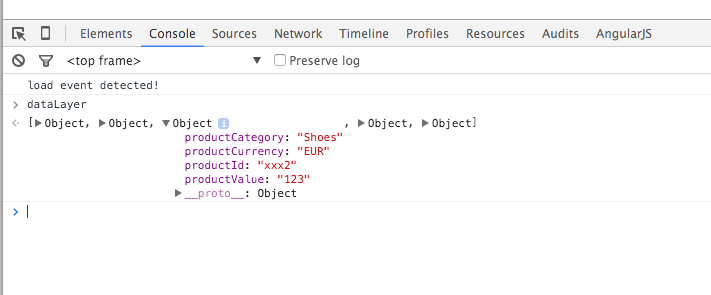
Buka website Anda menggunakan Google Chrome dan browse ke halaman apapun dengan rincian produk. Kemudian klik kanan di mana saja pada halaman dan pilih "Periksa". Beralih ke tab Console dan ketik "dataLayer". Isi sekitar Objects untuk menemukan nama variabel. Ini akan terlihat seperti ini:

variabel Anda mungkin akan memiliki nama yang berbeda.Tapi dalam kasus contoh kita:

ID Produk = productIdHarga produk = productValueKategori produk = productCategoryMata uang produk = productCurrency

Catatan: Anda harus menemukan setidaknya ID produk dalam rangka untuk menjalankan DPA. Variabel yang lain adalah opsional, tetapi mereka akan membiarkan Anda melakukan penargetan ulang yang lebih canggih.

2. Sambungkan Variabel dataLayer Anda ke Google Pengelola Tag

Sekarang bahwa Anda telah mengidentifikasi variabel dataLayer Anda menggunakan Google Chrome, Anda perlu menghubungkan mereka ke Google Pengelola Tag.pencocokan ini dilakukan di bagian Variabel.

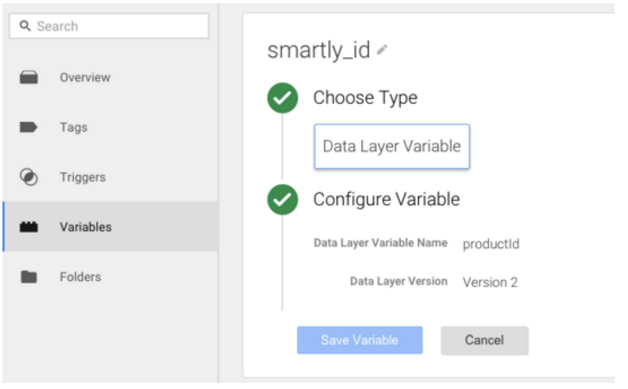
Contoh ini menggunakan konvensi penamaan Smartly.io, di mana smartly_id = productId dari dataLayer, tetapi tentunya Anda bisa memetakan mereka menggunakan konvensi apapun yang Anda suka.

Buka Google Pengelola TagBuka bagian VariabelBuat Variable baru (Variabel Buatan Pengguna)Nama itu smartly_idPilih Variabel Lapisan DataCopy-paste nama variabel yang digunakan dalam Anda dataLayer (productId di contoh kita)Jauhkan Version 2, yang merupakan pilihan defaultBuat variabel

Ulangi langkah ini untuk semua variabel untuk mengirim informasi lebih lanjut kepada pixel tentang harga produk, kategori, mata uang dan yang langkah corong pembelian pengguna statusnya berada di. Perhatikan langkah 4 dan 6 untuk mengubah nilai-nilai untuk setiap variabel.

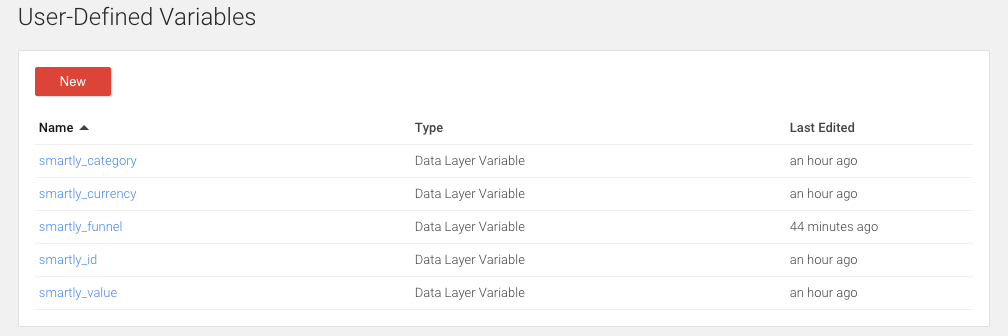
smartly_category → Kategori produkHarga produk smartly_value →Mata uang Produk smartly_currency →smartly_funnel → Tahap penjualan menyalurkan pelanggan, nilai ini berada di dataLayer)

Anda akan berakhir dengan daftar variabel yang ditetapkan pengguna:

Test: Anda dapat memilih 'Preview dan Debug' perubahan hanya dalam browser Anda sebelum Anda mempublikasikan untuk memastikan semuanya bekerja dengan baik. Kembali ke website Anda dan menutup alat Periksa-. Refresh browser untuk melihat Google Pengelola Tag pratinjau.Variabel sekarang harus memiliki nilai-nilai dari situs web Anda ditugaskan.

3. Buat Pemicu Berdasarkan Jalur dan Variabel Nama

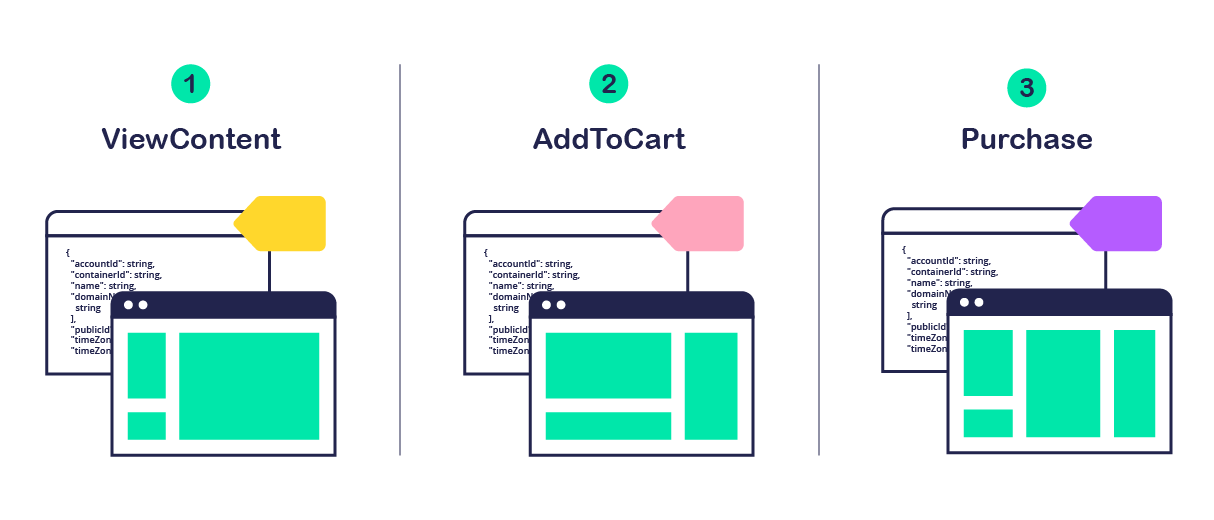
Sekarang bahwa Anda sudah cocok dengan variabel di website Anda dengan yang di Google Pengelola Tag, Anda dapat membuat pemicu berdasarkan titik di "jalur" yaitu penjualan corong ( 1: melihat produk , 2: ditambahkan ke keranjang , 3 : dibeli ).

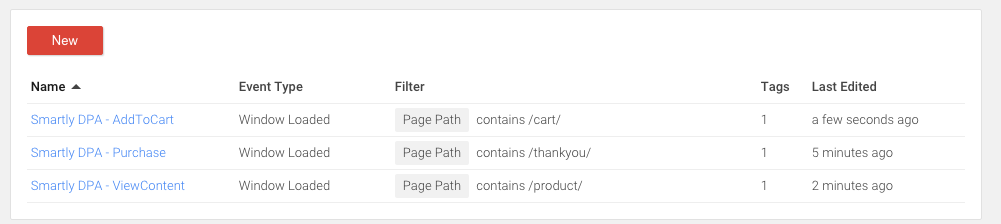
Buka Google Pengelola Tag dan pilih Pemicu> NewMengubah nama pemicu "cerdas DPA - ViewContent"Pilih "Page view"Mengkonfigurasi jenis pemicu = Jendela Loaded (ini adalah untuk memastikan itu beban setelah segala sesuatu yang lain)Api pada = Beberapa Page View 
Anda memiliki 3 pilihan utama untuk bagaimana api pelatuk. Memilih antara. (mudah) b.(lanjutan) c. (jika Anda tidak dapat menggunakan atau b)Jalur Laman berisi / produk / (mengubah ini berdasarkan struktur URL website Anda)Jika Anda dapat menemukan variabel dataLayer terkait untuk membeli corong, pilihJika Anda tidak dapat memilih dua opsi pertama, cobalah menggunakanselector CSS (lanjutan)Buat Pemicu

Ulangi proses ini untuk dua pemicu lainnya, mengubah nama pemicu pada langkah 2 sebagai " cerdas DPA - AddToCart " dan " cerdas DPA - Pembelian " dan perubahan yang halaman mereka api pada langkah 5 sesuai.

Anda harus berakhir dengan tiga pemicu di Google Pengelola Tag, seperti pada gambar di bawah:

4. Tambahkan Modifikasi Pixel

Jika Anda telah melakukan segalanya dengan benar sejauh ini, ini akan menjadi bagian yang paling mudah.

Lihat Konten

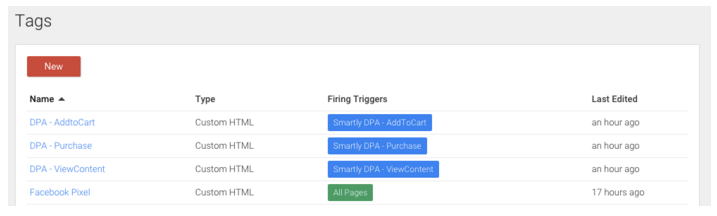
Buat tag baruNama itu " DPA - ViewContent "Pilih Custom HTMLTempelkan kode pixel dimodifikasi ini
<! - Facebook DPA Modifikasi Pixel Kode oleh Smartly.io -> <Script> FBQ ( 'track', ' ViewContent ', { content_ids: [ ''], content_category: [ ''], Nilai:, mata uang: '', content_type: 'produk' }); </ Script> <! - End Pixel Kode -> Api pada: Pilih 'More'Pilih pemicu disebut "cerdas DPA - ViewContent" dari pemicu Anda diterapkan di bagian 3 artikel iniBuat Tag


Ulangi proses ini dengan dua langkah lain dalam corong, menggantikan ' ViewContent ' di dalam langkah-langkah 2, 4 dan 6 dengan ' AddToCart ' dan ' Pembelian ' masing-masing.

Test: Anda dapat menguji Anda melakukan ini dengan benar dengan Preview dan Debug di Tag Manager. Buka website Anda dengan Chrome dan kembali halaman tersebut.Kemudian dari Google pratinjau Tag Manager, melihat Tags → Tags Dipecat pada Halaman ini. Periksa dariPlugin Facebook Pixel Helperbahwa piksel peristiwa berada di tempat.

pemirsa Anda akan diperbarui di hampir real-time sekali pengunjung ke situs Anda cocok dengan aturan Pemirsa.Sehingga Anda dapat mulai untuk secara dinamis target ulang pengunjung website Anda menggunakan DPA dalam hitungan menit

Minggu, 24 April 2016

Mengenal Iklan di Situs Facebook

Tentang Beriklan di Facebook

* Saat ini, mengelola preferensi iklan Anda hanya tersedia di beberapa wilayah.

Bagaimana Iklan Ditayangkan di Facebook

Bisnis membuat sebuah iklan. Mereka memilih jenis pemirsa yang ingin dijangkau. Jika Anda termasuk dalam pemirsa itu, Facebook akan menampilkan iklan tersebut kepada Anda.

Membuat Iklan Lebih Baik dan Memberi Anda Kontrol Lebih Besar

Ketika kami bertanya kepada pengguna Facebook tentang iklan, hal terpenting yang mereka katakan kepada kami adalah bahwa mereka ingin melihat iklan yang lebih relevan dengan minat mereka. Kami mempelajari tentang hal ini, terutama dari aktivitas Anda di Facebook, seperti Halaman yang Anda sukai. Kami juga mempelajari tentang minat Anda dari beberapa situs web dan aplikasi yang Anda gunakan. Kami menyebutnya sebagai iklan berbasis minat, dan banyak perusahaan melakukan ini.

Bagaimana cara kerjanya?

Kita asumsikan bahwa Anda akan membeli TV baru, dan Anda mulai melihat-lihat TV di internet dan di aplikasi seluler. Berdasarkan aktivitas ini, kami mungkin menampilkan iklan di sebuah TV untuk membantu Anda mempertimbangkan harga atau merek terbaik. Dan karena kami berpikir bahwa Anda tertarik dengan peralatan elektronik, maka di waktu mendatang kami akan menampilkan kepada Anda iklan untuk barang-barang elektronik lainnya, seperti speaker atau konsol permainan untuk digunakan bersama TV baru Anda.

Facebook patuh terhadap kerangka kerja yang dibangun oleh Digital Advertising Alliance, European Interactive Digital Advertising Alliance, dan Digital Advertising Alliance of Canada, sebuah koalisi organisasi yang mengembangkan standar privasi untuk iklan online, sehingga bila Anda tidak ingin kami menampilkan iklan terkait di situs web dan aplikasi yang Anda sedang gunakan, maka kami tidak akan menampilkannya. Jika Anda tidak ingin Facebook menggunakan informasi untuk menampilkan iklan berdasarkan aktivitas Anda di situs web atau aplikasi selain Facebook, Anda dapat menolaknya melaluipengaturan Anda. Pelajari selengkapnya tentang iklan berdasarkan minat online di Facebook. Anda juga dapat menolak semua perusahaan yang berpartisipasi melalui Digital Advertising Alliance di Amerika, Digital Advertising Alliance of Canada di Kanada, atauEuropean Interactive Digital Advertising Alliance di Eropa, selain itu Anda juga dapat menolaknya melalui pengaturan perangkat seluler Anda.

Bagaimana cara mengelola iklan yang ditampilkan kepada saya?

Pengguna Facebook juga mengatakan kepada kami bahwa mereka menginginkan kontrol yang lebih besar atas iklan yang ditampilkan kepada mereka. Itulah mengapa kami memperkenalkan preferensi iklan, alat baru yang dapat diakses dari setiap iklan di Facebook, yang menjelaskan mengapa Anda melihat iklan tertentu, serta memungkinkan Anda untuk menambah dan menghapus preferensi yang kami gunakan untuk menampilkan iklan tersebut kepada Anda. Dengan demikian, jika Anda tidak tertarik dengan peralatan elektronik, Anda dapat menghapus peralatan elektronik dari preferensi iklan Anda.

Lihat dan sesuaikan preferensi iklan Anda di sini.

Untuk mempelajari selengkapnya, kunjungi Tentang Iklan Facebook atau baca Kebijakan kuki kami.

Tautan Permanen · Bagikan

Seberapa membantukah jawaban ini?

Bagaimana Facebook memutuskan iklan mana yang akan ditampilkan kepada saya dan bagaimana cara mengontrol iklan yang ditampilkan kepada saya?

Kami berharap iklan yang Anda lihat di Facebook menjadi semenarik mungkin, dan memberi Anda manfaat maksimal. Untuk memutuskan iklan yang ditampilkan kepada Anda, kami menggunakan:

Informasi yang Anda bagikan di Facebook (mis: Halaman yang Anda sukai).

Informasi lainnya tentang Anda dari akun Facebook Anda (mis: usia, jenis kelamin, lokasi, perangkat yang Anda gunakan untuk mengakses Facebook).

Informasi Anda yang dimiliki oleh pengiklan dan mitra pemasaran dan dibagikan kepada kami, misalnya alamat email Anda.

Aktivitas Anda di situs web dan aplikasi di luar Facebook.

Untuk informasi selengkapnya tentang bagaimana informasi yang diterima oleh Facebook dan bagaimana menggunakannya, kunjungi Kebijakan Data danKebijakan Kuki kami.

Anda memiliki beberapa cara untuk mengontrol iklan yang kami perlihatkan kepada Anda:

Sesuaikan preferensi iklan Anda. Klik  atau  di dekat sudut kanan atas iklan Facebook, dan pilih Mengapa saya melihat ini? Anda akan melihat penjelasan tentang mengapa Anda melihat iklan tersebut, dan Anda dapat menambahkan atau menghapus diri Anda sendiri dari pemirsa iklan tersebut. Pilih Kelola preferensi iklan Anda untuk melihat pemirsa lainnya yang mendapatkan tayangan iklan serupa dengan yang Anda lihat di Facebook, dan sesuaikan kelompok pemirsa mana yang merupakan bagian kelompok Anda. Anda juga dapat melihat dan sesuaikan preferensi iklan Anda di sini.

Gunakan kontrol pengiklanan berbasis minat. Jika Anda tidak ingin Facebook menggunakan informasi berdasarkan aktivitas Anda di situs web atau aplikasi selain Facebook untuk tujuan menampilkan iklan, Anda dapat menolaknya dari pengaturan. Pelajari selengkapnya tentang iklan berdasarkan minat online di Facebook. Anda juga dapat menolak semua perusahaan yang berpartisipasi melalui Digital Advertising Alliance di Amerika, Digital Advertising Alliance of Canada di Kanada, atau European Digital Advertising Alliance di Eropa, selain itu Anda juga dapat menolaknya melalui pengaturan perangkat seluler Anda.

Untuk informasi selengkapnya tentang iklan di Facebook:

Kunjungi pengaturan iklan Anda

Pelajari selengkapnya tentang iklan Facebook

Tautan Permanen · Bagikan

Seberapa membantukah jawaban ini?

Apa preferensi iklan saya?

Preferensi iklan Anda adalah cara untuk mempelajari mengapa Anda melihat iklan tertentu, dan mengontrol bagaimana kami menggunakan informasi tentang Anda, baik dari dalam maupun dari luar Facebook, untuk memutuskan iklan yang ditampilkan kepada Anda.

Pelajari selengkapnya tentang cara melihat dan menyesuaikan preferensi iklan Anda dan bagaimana Facebook memutuskan iklan yang ditampilkan kepada Anda. Anda juga bisa memberi masukan pada iklan yang Anda lihat.

Saat ini, preferensi iklan hanya tersedia di beberapa wilayah.

Tautan Permanen · Bagikan

Seberapa membantukah jawaban ini?

Informasi Anda dan Iklan Facebook

Preferensi Anda didasarkan pada informasi yang Anda bagikan kepada Facebook, Halaman yang Anda sukai atau yang berinteraksi dengan Anda, iklan yang Anda klik, aplikasi dan situs web yang Anda gunakan dan informasi dari penyedia data kami, serta pengiklan.

Apakah Facebook menggunakan nama atau foto saya dalam iklan?

Foto profil atau nama Anda dapat dipasangkan dengan iklan untuk menunjukkan aktivitas Anda di Facebook (mis: jika Anda mengikuti Halaman Starbucks). Ingat bahwa nama dan foto profil Anda hanya akan dilihat orang-orang yang memiliki izin melihat suka dari Halaman Anda.

Pelajari selengkapnya tentang iklan dan privasi sertacara kerja iklan di Facebook.

Tautan Permanen · Bagikan

Seberapa membantukah jawaban ini?

Bagaimana Facebook bekerja sama dengan penyedia data?

Penyedia data Facebook khusus membantu pengiklan menemukan orang yang tepat untuk menampilkan iklannya. Sebagai contoh, Facebook bekerja sama dengan penyedia data untuk menemukan orang di Facebook yang mereka anggap bahwa para pengiklan akan menjangkaunya, berdasarkan preferensi orang-orang tersebut. Berikut ini adalah beberapa penyedia data yang bekerja sama dengan kami: Acxiom, Datalogix, Epsilon, Experian, dan Merkle.

Pelajari selengkapnya tentang bagaimana kami menggunakan informasi tentang Anda di Kebijakan Data kami.

Tautan Permanen · Bagikan

Seberapa membantukah jawaban ini?

Bagaimana Facebook dan perusahaan lain menggunakan cookie yang terkait dengan iklan yang ditampilkan?

Facebook dan perusahaan lain menggunakan teknologi seperti cookie, tag piksel, dan penyimpanan lokal untuk menampilkan iklan yang bermanfaat untuk Anda. Sebagai contoh, cookie dapat membantu pengiklan memahami apakah Anda melihat iklan untuk produk mereka di Facebook sebelum membelinya dari situs web mereka.

Pelajari selengkapnya tentang bagaimana Facebook menggunakan teknologi ini.

Tautan Permanen · Bagikan

Seberapa membantukah jawaban ini?

Mengontrol Iklan yang Anda Lihat

Lihat iklan yang lebih menarik dan bermanfaat di Facebook dengan memperbarui preferensi iklan Anda untuk menggambarkan hal yang menjadi perhatian Anda.

Bagaimana cara menyesuaikan penargetan iklan berdasarkan aktivitas saya di luar Facebook?

Jika Anda tidak ingin Facebook menggunakan informasi berdasarkan aktivitas Anda di situs web atau aplikasi selain Facebook untuk tujuan menampilkan iklan, Anda dapat menolaknya melalui pengaturan. Pelajari selengkapnya tentang iklan berdasarkan minat online di Facebook.

Anda juga dapat menolak semua perusahaan yang berpartisipasi melalui Digital Advertising Alliance di Amerika, Digital Advertising Alliance of Canada di Kanada, atau European Interactive Digital Advertising Alliance di Eropa, selain itu Anda juga dapat menolaknya melalui pengaturan perangkat seluler Anda.

Tautan Permanen · Bagikan

Seberapa membantukah jawaban ini?

Bagaimana cara melihat dan menyesuaikan preferensi iklan saya?

Untuk melihat dan menyesuaikan preferensi iklan Anda:

Klik  atau  di dekat sudut kanan atas iklan di FacebookPilih Mengapa saya melihat ini?

Anda akan melihat penjelasan tentang mengapa Anda melihat iklan tersebut, dan Anda dapat menambahkan atau menghapus diri Anda sendiri dari pemirsa iklan tersebut. Klik Kelola preferensi iklan Anda untuk melihat pemirsa lain yang mendapatkan tayangan iklan serupa dengan Anda di Facebook. Anda juga dapat melihat dan sesuaikan preferensi iklan Anda di sini.

Mengubah preferensi iklan mempengaruhi iklan yang Anda lihat, namun tidak mengubah jumlah total iklan yang Anda lihat. Ingat, kadang pengiklan meminta Facebook menampilkan iklan serupa kepada beberapa pemirsa, atau kepada pemirsa luas. Sebagai contoh, sebuah perusahaan ingin menjangkau orang yang menyukai olahraga. Jika Anda menghapus diri Anda sendiri dari pemirsa yang menyukai sepak bola, namun bukan dari pemirsa yang menyukai basket, Anda masih melihat iklan perusahaan tersebut.

Catatan: Facebook selalu menggunakan informasi tentang usia, jenis kelamin, lokasi, dan perangkat yang Anda gunakan untuk mengakses Facebook saat memutuskan iklan yang ditampilkan kepada Anda.

Tautan Permanen · Bagikan

Seberapa membantukah jawaban ini?

Bagaimana cara memberi masukan tentang iklan yang saya lihat?

Ada beberapa cara untuk memberi masukan kepada kami tentang iklan yang Anda lihat di Facebook. Memberi masukan kepada kami akan berpengaruh terhadap iklan yang kami tampilkan kepada Anda di masa mendatang. Untuk memberi masukan kepada kami:

Beri tahu selengkapnya tentang apa yang Anda sukai.Menyukai Halaman dan menambahkan hal-hal yang Anda sukai ke profil Anda (mis: film, band, tim olahraga) akan membantu kami menayangkan iklan yang lebih relevan kepada Anda.

Beri tahu kami saat Anda melihat iklan yang disukai.Klik  atau  di dekat sudut kanan atas iklan di Facebook, lalu pilih Iklan ini bermanfaat. Kami akan berusaha semaksimal mungkin untuk menampilkan iklan seperti itu kepada Anda di masa mendatang.

Sembunyikan iklan yang tidak Anda sukai. Klik  atau  di sudut kanan atas iklan, lalu pilih Saya tidak ingin melihat ini. Kami akan berusaha semaksimal mungkin untuk tidak menampilkan iklan seperti itu kepada Anda di masa mendatang.

Sesuaikan preferensi iklan Anda. Untuk mempelajari informasi yang digunakan Facebook dalam menampilkan iklan dan memilih preferensi yang mempengaruhi iklan yang Anda lihat, sesuaikan preferensi iklan Anda. Saat ini, preferensi iklan hanya tersedia di beberapa wilayah.

Gunakan kontrol pengiklanan berbasis minat. Jika Anda tidak ingin Facebook mengumpulkan informasi berdasarkan aktivitas Anda di situs web atau aplikasi selain Facebook untuk tujuan menampilkan iklan, Anda dapat menolaknya dari pengaturan. Pelajari selengkapnya tentang iklan berdasarkan minat online di Facebook. Anda juga dapat menolak semua perusahaan yang berpartisipasi melalui Digital Advertising Alliance di Amerika, Digital Advertising Alliance of Canada di Kanada, atau European Interactive Digital Advertising Alliance di Eropa, selain itu Anda juga dapat menolaknya melalui pengaturan perangkat seluler Anda.

Tautan Permanen · Bagikan

Chuyên mục văn hoá giải trí của VnExpress

.

© 2017 www.blogthuthuatwin10.com

Tầng 5, Tòa nhà FPT Cầu Giấy, phố Duy Tân, Phường Dịch Vọng Hậu, Quận Cầu Giấy, Hà Nội
Email: nguyenanhtuan2401@gmail.com
Điện thoại: 0908 562 750 ext 4548; Liên hệ quảng cáo: 4567.